The Inclusive Classroom with Microsoft

From accessibility to inclusion - Accessibility and inclusion are closely related, but inclusion goes even further.
Join us for two 45 minute sessions to show you what Microsoft has to offer to bring inclusion into the classroom.
Dates: 22 and 29 March from 7.00pm
The following chart outlines what happens when we move from accessibile to inclusive -
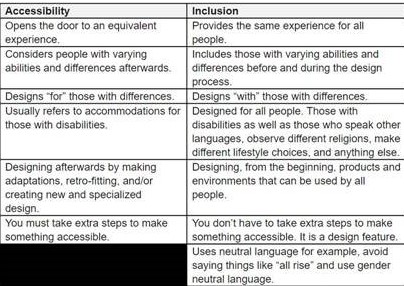
Areas this course will cover are:
- Reading –Immersive Reader (Showcase the number of apps available on)
- Dictate (Showcase the number of apps available on)
- Edge - accessibility
- OneNote - leave audio notes
- Hearing impaired – captions
- Flipgrid – shorts for video
- EAL – translate (Immersive Reader), Powerpoint, Translator App
- Office lens – Read aloud add OCR to documents
- Reading progress – track reading fluency in students in English and MFL
Facilitator: Karen Burke
 Karen Burke is the Customer Service Manager in Microsoft Education Ireland in that role she supports the development and training to allow for the development of successful digital strategies in educational institutions.
She is a MIE Master Trainer and specialises in the use the use of Office 365 as a platform for Teaching & Learning with a particular focus on Microsoft Teams & OneNote. Karen is an educator with more than 10 years’ experience in UK and Ireland and has previously worked in one of Microsoft Showcase Schools.
Link with me on Twitter: @MsKBurke1
Course Properties
| Course Date | 22-03-2022 7:00 pm |
| Course End Date | 29-03-2022 7:45 pm |
| Capacity | 55 |
| Available place | 11 |
| Individual Price | Free |
| Speaker | Karen Burke |
| Select Hours | 1.5 |
| Location | Online |
| Categories | Post Primary, Primary |